
Digital Essays for Legal Learning
BARBRI Bar Review is the premier personal edtech resource for law school graduates attempting to pass their Bar Exam in hopes of becoming licensed attorneys within their desired jurisdictions. As Lead Product Designer for BARBRI, I was assigned to upgrade our antiquated essay-prep submission process with a brand-new, digital essay-writing application - focusing on producing a student-centered writing experience and reducing user-errors.
Duration: Feb 2024 - 2025
Tools: Figma
Product Owners: Erika Rambler &
Jennie Hayes
Services Provided: Product Design
(Sole Contributor - Lead UX Designer)

Business Background & UX Goals
Founded in the 1960s, BARBRI has long been a market leader and resource for law students looking to prep for the Multi-state Bar Examination. Originally providing in-book/print-only prep courses and materials, the company has since pivoted to providing tech-enabled, educational learning experiences and recourses to aid legal learners worldwide.
As part of BARBRI's strategic roadmap to modernize an outdated essay submission workflow, this new user experience enables bar exam studiers to seamlessly word process and submit essays for grading and review. With over 80,000 essay submissions during each 6-8 week Summer Bar prep session—and a promise of unlimited essay practice to students—this application is a key piece within a larger, comprehensive essay management system. Its purpose is to automate the submission process and enhance digital grading and feedback for student-users. The ultimate goal is to help students develop the proficiency needed to produce high-scoring essays and pass the Bar exam.
Additionally, by offering an engaging in-app, essay-writing experience, the system aims to address a specific user challenge: students often delay submitting their essays until the final weeks of their prep sessions due to convenience/technical issues with the original essay submission process. By encouraging students to submit essays in-app and as recommended by their personalized study plans, the system helps spread out submissions across the full 6-8 bar prep timeframe, avoiding the operational strain of managing and returning over 80,000 essays within a compressed
2-3 week period.
Along with reducing incorrect uploads and submission errors by improving this experience, we also aimed to achieve the following UX goals and feature implementations:
-
Create a digital Table of Contents & Add a Note feature to help students navigate through and organize essay prompts and case library materials to aid their argument building,
-
Introduce accessibility tools and features to build an inclusive writing experience for student-users of all abilities & learning styles,
-
Launch a Student Self-Grading exercise to deepen essay-takers’ understanding of the grading and scoring process for Bar exam essays, better preparing them for their actual exam.
Process Challenges & Solutions
As with every project, challenges can arise as any point in the process; and while having standardized process and team collaboration helps mitigate problematic hurdles, sometimes issues become unavoidable. During our team's planning, research & development phases we ran into a few unexpected speed bumps that slowed our momentum and required us to rethink our strategy; for example:
-
Content alignment with Table of Contents & Rubrics - Another difficult challenge was ensuring full alignment with the content team in digitizing previously print-only essay prompts, case libraries, and grading rubrics into our new in-app essay experience. Without this alignment our Table of Contents and Self-Grading features wouldn't be accurate and would render our experience invaluable for essay-takers.
Solution: Through extensive collaboration between the tech and content teams—supported by numerous meetings—my Product Owner and I fostered a shared vision for the desired user-centered outcome of this experience across both teams. This alignment between our teams and content played a crucial role in harmonizing both UX and book layout hierarchies. By enabling students to seamlessly use their books alongside digital essay case files and rubrics, this approach ensured both an enhanced user experience and accurate, verifiable data migration.
-
Mobile UX Considerations - After recently upgrading BARBRI’s mobile learning platform, we aimed to ensure students could access a cohesive mobile experience across all question types in BARBRI's learning plans. However, since the actual bar exam is administered in a proctored digital testing-environment—never on a mobile device—we hypothesized that effective exam preparation, specifically for essays, required emulating the exam environment as closely as possible. Contrarily, leaving this part of the mobile experience out left a gap in our mobile learning application.
Solution: To fill this gap, we enabled student-users to access mobile score reports with essay performance analytics and grader feedback for convenient on-the-go review, while guiding them to complete essay assignments on a desktop or tablet. This feature provides essential insights to bar prep students while helping to ease test-prep anxiety on-the-go.
Features Showcase
The Table Of Contents-FAB feature streamlines the essay-taking experience by enabling users to effortlessly navigate through multi-page essay prompts and case libraries at any point in their writing experience. It allows quick transitions between case articles and provides an easy way to return to the top of the assignment prompt or case library at any time.


The new Highlighter/Add a Note tool allows students to annotate and organize key case study information to support their essay arguments. Students can either highlight specific text or add detailed notes to any highlighted section. With the multi-color highlighter, they can color-code their notes for better organization, and the Notes Tab provides a clear, centralized view of all their notes while students write their essay.
Prioritizing accessibility in our UX design, we implemented several features to support students of all abilities. For instance, students with accommodations for extended time can adjust the timer settings, while those with testing anxiety have the option to hide the timer entirely. Additionally, customizable text size and line height settings allows students to tailor their reading experience to fit their needs.


The introduction of the Self-Grading exercise empowers bar prep students by providing a deeper understanding of the rubrics used to evaluate their essays. By assessing their own work, students can identify weaknesses in their arguments and adjust their writing strategies as they prep for their bar exam. Students will also have the choice to submit their essay to a BARBRI grader for professional evaluation.
Notable Impacts & Outcomes
-
Successfully conducted usability testing and student interviews to validate the new Essay UX and accessibility features with student-users.
-
With the successful migration of all essay-content tailored to specific jurisdictions (VA, FL, CA, and all 41 UBE jurisdictions), there is continued positive user feedback following the release of the MVP Student-Essay experience.
-
Facilitated cross-functional collaboration among technology, learning, content, and operations teams, driving business digitization by aligning efforts toward a unified tech-focused strategy.
-
Laid the groundwork for expanding mobile analytics across other BARBRI digital learning products by introducing Mobile Score Reports for Essays.
-
Forecasted to manage and support the intake of over 125 thousand bar prep essays by Summer 2026 (BARBRI internal data).
Keep scrolling for more insight into the production of Student Essay UX


UX Process
Our tech team at BARBRI operated in close collaboration as “Product Squads," with each squad being responsible for their segment of BARBRI-affiliated products. With this particular project assuming considerable business risk, I worked in conjunction with the Director of Product & Lead Software Engineer to understand the business objectives from stakeholders, derive requirements, and lead the UX & design process. It was my responsibility ensure user needs were considered throughout the development process, lead research, and design a user-centered experience.


Planning & Defining Requirements
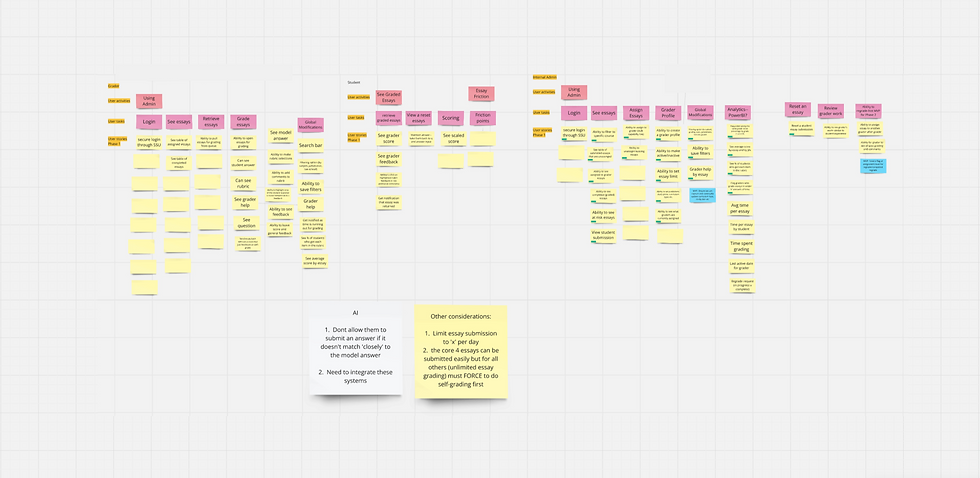
Meeting often and early with stakeholders, high-level planning and virtual white-boarding going into this project was crucial for organizing our design and development efforts. With this experience being one part of a larger essay-management system, along with the integration of artificial intelligence, we understood from the get-go that we had a menagerie of goals to achieve and limited time and resources. To manage our undertaking, we broke each piece of the system into user groups and identified the user outcomes and features needed for a minimal valuable marketplace release.
Mapping out our requirements into a high-level overview allowed us to find common dependencies across each experience in hopes of streamlining our UX and development process. With each segment broken down, we had the building blocks needed to begin researching and ideating on how we could deliver the most impactful experience for our users.


To help direct my UX approach, I conducted research on widely used word-processing programs, examining how they implement and layout key features like multi-page formatting, screen layouts, annotations, and accessibility tools. The purpose was twofold: (1) to identify user expectations and habits with word-processing tools, and (2) to adapt these insights into our design while aligning with BARBRI’s design system.
In parallel, we collaborated with BARBRI’s leading subject-matter experts—professionals responsible for crafting the learning materials and grading student essays. These experts were invaluable in educating our team on the nuances of essay writing and evaluation during bar prep. Their input gave us more insight into student writing and submission behaviors, the types of feedback students found most meaningful, and the types of complaints they often encountered with essay students. Their insight also helped us advance our student self-grading platform and optimize the submission process crucial to the success of this project. This is also where we encountered and ameliorated previously mentioned content challenges with book-alignment and rubrics.
Through high-level planning, user research, competitive analysis, and collaboration with experts, I gathered the insights necessary to begin visualizing our new essay-writing experience and its features with confidence.
Design & Prototyping
During the design phase, I could finally together bring all we had learned and researched to create our new essay experience. Having played an integral part in establishing BARBRI’s design system, my goal was to continue leveraging design patterns and UI elements to create an experience that aligned with the cohesive look and feel of our broader product suite. My design process always starts with sketching, allowing me to quickly explore and iterate on initial patterns and ideas. Once a clear UX pathway is envisioned, I transition my sketches into digital wireframes for initial reviews and presentations to my team and stakeholders. Feedback from these discussions informs revisions, which are then incorporated into mid-fidelity, grayscale screens. At this stage, I focus on highlighting new features and user flows before moving on to high-fidelity designs for prototyping and testing.
Throughout this process, I relied on tools like Miro and Figma to create screens, prototype interactions, and facilitate collaboration with teammates and stakeholders


User Testing
After finalizing designs and creating a fully-functional prototype, it was important that we validate the newly proposed essay experience with student-users. To validate our experience, I led and facilitated a user research initiative with proctored, testing sessions to observe firsthand how users interacted with our application. Using our prototyped experience, student-users were asked to complete tasks as they would if they were using our platform to complete an essay, add/edit a note, and find articles quickly within their case library. Additionally, we inquired about their expected outcome depending on which grading path they selected to complete review (self-grading vs submit to a grader).
While I was fortunate to have a plethora of recent student-users from the 2024 summer bar prep season to invite to my study, it was unfortunately difficult to recruit recent bar-exam takers for testing time (mostly due to study fatigue from prepping for their bar exam). Eventually, I was able to gather a small, testing group of five student-users. From these testing efforts, we were about to report that 80% of users were able to successfully complete all tasks without needing any additional assistance or prompting.
Develop & Launch
After completing testing and validating our UX, I handed off the finalized designs and interactions to the development team for implementation. Although the UX work was “complete” for this phase, I was nevertheless collaborating daily with my product owner and development squad to refine and troubleshoot any user experience or design-related issues. Updating JIRA tickets, assisting with writing CSS, and fine tuning interactions & design specs with engineers were just a few of the daily tasks I often assisted on.
Working in an agile methodology with a trusted scrum master, our team divided up work into two-week sprints and consistently participated in planning, grooming, and squad retros to improve our team processes. At the end of our process, our team was successful in launching a usable beta that would be further tested and integrated with the rest of the BARBRI Learning Suite.

Iterate & Expand
Our team successfully launched the initial version of our student essay-writing application, but this was just the beginning. As we continue to gather meaningful feedback from real users, their early interactions and behaviors provide valuable insights into how we can further iterate and enhance the essay-writing experience. The true impact of our efforts will become clear during the next few bar exam sessions when we analyze essay score data. If we observe a trend over the next few sessions where students’ essay scores improve during their preparation and correlate with passing scores on the bar exam, we’ll know we’ve created an effective tool for our students.
While the initial success of this project definitely feels like a win, our squad continues to develop and integrate the professional grader and operational administrator experiences to complete our larger essay-management platform.
